
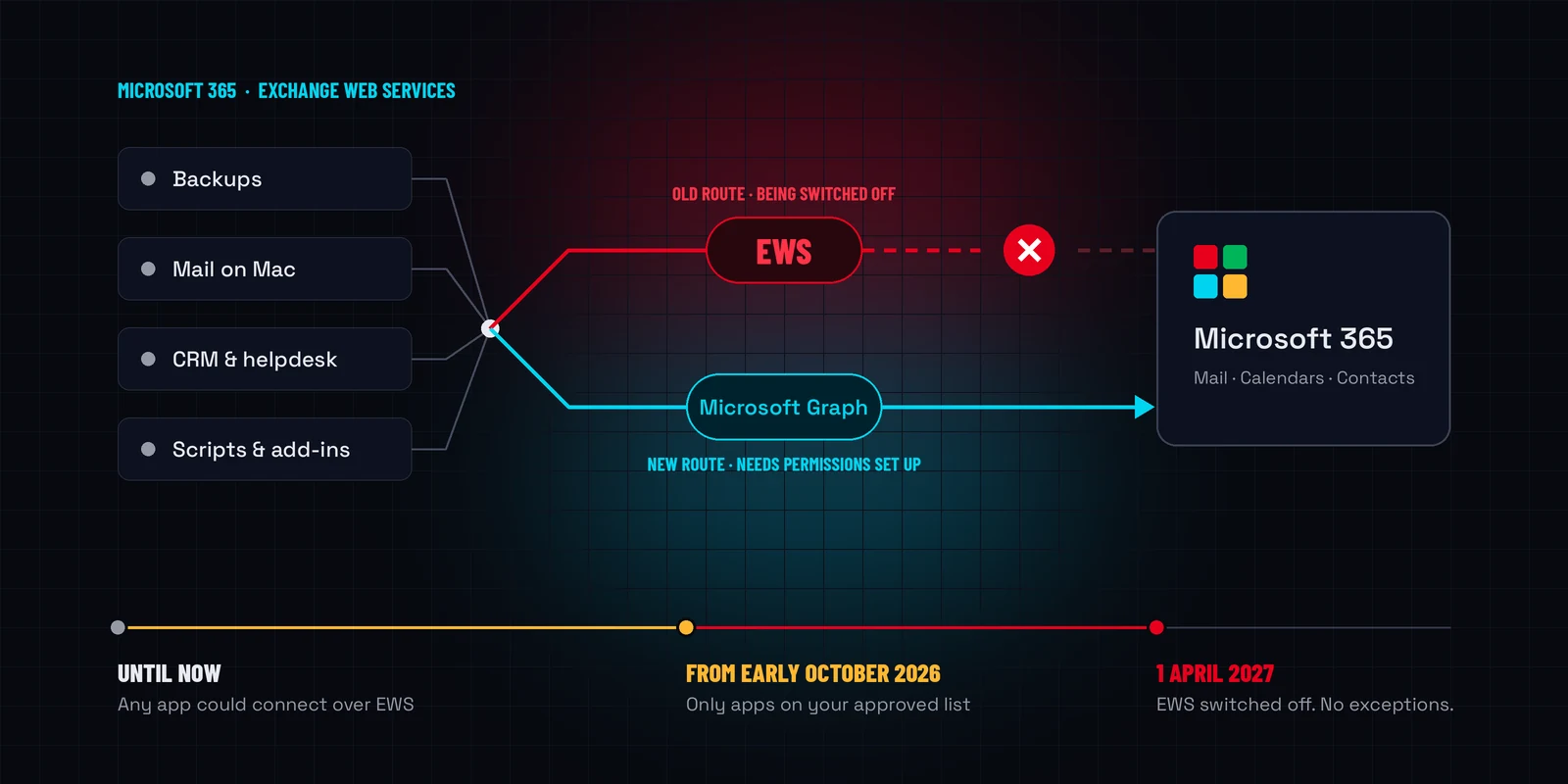
Microsoft is retiring Exchange Web Services (EWS) from Exchange Online. EWS is an old connection method. Backup platforms, email apps and business systems have used it for years to read Microsoft 365 mailboxes, calendars and contacts.
Microsoft has been warning about this since 2018. Now it’s happening, in two stages:
- From early October 2026: Microsoft starts blocking EWS tenant by tenant. After that, only apps on your organisation’s approved EWS list can connect. Microsoft is building each approved list from the last 60 days of activity, and it warns that apps used only occasionally may be missed.
- 1 April 2027: EWS is switched off permanently in Exchange Online. There are no exceptions.
Microsoft is moving everything to Microsoft Graph, its modern connection method. Graph offers tighter security, finer permissions and better visibility. Microsoft says a 2024 nation-state attack that abused EWS is one reason it sped the retirement up.
What does this mean for Anvil customers?
Microsoft 365 backups. Most Microsoft 365 backup platforms are moving from EWS to Graph. Microsoft is still finishing some of the Graph features backups rely on, including full archive mailbox support, which is due by the end of 2026. So many backup services need EWS approved through the transition and Graph permissions in place for after it.
We’re working through affected Microsoft 365 environments now. For each one, we:
- Confirm how your backup platform connects to Microsoft 365.
- Make sure it’s on your tenant’s approved EWS list for the transition.
- Update Microsoft 365 permissions and reauthorise the backup service where the vendor needs it.
- Confirm scheduled backups are completing successfully.
In many cases this needs only a small amount of chargeable technical work by Anvil. The exact work depends on your backup product and how your Microsoft 365 environment is set up. If your backup service already connects entirely through Graph, you may not need any changes.
One important point: being able to open your email in Outlook doesn’t mean your backups are healthy. People and applications connect in different ways, so a backup can quietly fail while email carries on as normal.
Will this affect Apple Mail?
iPhone and iPad: No. Apple Mail on iPhone and iPad connects to Microsoft 365 through Exchange ActiveSync, not EWS.
Mac: Yes. On a Mac, Apple Mail, Calendar, Contacts, Notes and Reminders still use EWS to connect to Microsoft 365. Apple has said a future macOS 27 update will move these apps to Microsoft Graph, but it hasn’t given a date.
In practice, Apple Mail on a Mac may keep working through the transition if it’s approved in your tenant. From 1 April 2027 it will stop syncing unless Apple’s update has shipped and been installed.
What we recommend for Mac users:
- Switch to Microsoft Outlook for Mac now if Apple Mail is used for work email, especially with shared mailboxes or delegated calendars. It’s the reliable option and it’s included with most Microsoft 365 business plans.
- Keep macOS up to date so Apple’s Graph update installs as soon as it’s available.
- Don’t delete and re-add accounts because of this announcement. It won’t help.
- Contact Anvil if Mail, Calendar or Contacts keeps asking for a password or stops syncing.
What else could be affected?
EWS isn’t only used by backup software. Anything that reads from or writes to Microsoft 365 mailboxes or calendars could depend on it, including:
- Email archiving and compliance platforms
- CRM, helpdesk and ticketing systems
- Document management systems
- Calendar and room-booking systems
- Workflow and automation tools
- Reporting and monitoring services
- Apps that process shared mailboxes
- Custom scripts and in-house integrations
- Older Outlook add-ins and out-of-date Microsoft Office installs
- Third-party email apps on Mac and mobile
An app may depend on EWS even if nobody has ever heard the term. Common signs: it needed a Microsoft 365 administrator to approve mailbox access, it uses a dedicated service account, or it automatically reads messages from a shared mailbox.
What should you do now?
There’s no need to panic, and please don’t change your Microsoft 365 settings yourself. We recommend you:
- Tell us about any specialist app that connects to your Microsoft 365 email or calendars, especially one that’s only used occasionally, such as for month-end or annual processes, or speak to the vendor.
- Move Mac users from Apple Mail to Outlook for work email.
- Keep computers, phones and Microsoft Office up to date.
- Make sure your Microsoft 365 backups are actively monitored, not just set up.
- Budget for a small amount of technical work for backup maintenance, or for integrations that need to be reauthorised or migrated.
If you have questions about how this affects your business, call us on 09 579 5432 or email support@anvil.net.nz.